The “DNS_PROBE_FINISHED_NXDOMAIN” error on Android devices indicates a failure to resolve a domain name to its corresponding IP address. When an Android device attempts to access a website, it sends a request to a Domain Name System (DNS) server to translate the human-readable domain name (e.g., google.com) into a numerical IP address (e.g., 172.217.160.142), which computers use to locate each other on the internet. This error signifies that the DNS server either could not find the requested domain name or that the domain name does not exist, resulting in the connection failure. A common scenario involves attempting to access a valid website that returns this error due to temporary DNS server unavailability or incorrect DNS settings on the Android device.
The occurrence of this resolution failure hinders access to online resources and can be symptomatic of broader network connectivity issues. Understanding the root cause is crucial for effective troubleshooting. Historically, this type of error has been associated with misconfigured network settings, problems with the user’s internet service provider’s DNS servers, or even issues arising from the device’s own network configuration. Resolving this facilitates seamless internet browsing and the utilization of online applications, ensuring uninterrupted connectivity. It benefits users by restoring access to necessary information and services, fostering a reliable mobile experience.
Troubleshooting steps can include verifying network connectivity, clearing the device’s DNS cache, changing DNS servers, and ensuring that the device’s software is up to date. The following sections will explore specific solutions to address and resolve this common Android connectivity problem. These will encompass examining Wi-Fi settings, delving into advanced network configurations, and exploring the potential impact of specific applications.
Mitigating the “DNS_PROBE_FINISHED_NXDOMAIN” Error on Android
The following recommendations outline established practices to resolve the “DNS_PROBE_FINISHED_NXDOMAIN” error encountered on Android devices, ensuring stable network connectivity.
Tip 1: Verify Network Connectivity: Initial troubleshooting should involve confirming the device is actively connected to a Wi-Fi network or has a stable cellular data connection. Investigate potential issues with the network infrastructure, such as router malfunctions or ISP outages.
Tip 2: Clear the DNS Cache: Android devices store cached DNS information. Clearing this cache can remove outdated or corrupted entries. This can be achieved by resetting network settings or using a dedicated application to clear DNS data.
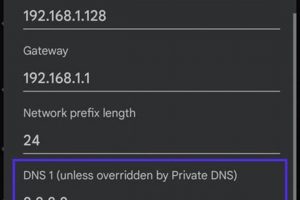
Tip 3: Change DNS Servers: The default DNS servers assigned by the ISP may be experiencing issues. Manually configuring the device to use public DNS servers, such as Google DNS (8.8.8.8 and 8.8.4.4) or Cloudflare DNS (1.1.1.1), can bypass problematic ISP-provided servers.
Tip 4: Reset Network Settings: A comprehensive reset of network settings will revert all saved Wi-Fi passwords and Bluetooth connections, while also clearing VPN configurations. This can resolve underlying configuration conflicts causing the error.
Tip 5: Check Router Configuration: Ensure the router’s firmware is up-to-date and that it is configured to automatically obtain DNS server addresses. Inspect router logs for any DNS-related errors.
Tip 6: Examine Third-Party Applications: Certain VPN or ad-blocking applications may interfere with DNS resolution. Temporarily disabling these applications can identify whether they are contributing to the issue.
Tip 7: Update Android Operating System: System updates often include bug fixes and improved network stability. Ensuring the device is running the latest version of Android can resolve underlying software issues causing this error.
Consistent application of these measures can significantly reduce the occurrence of this resolution failure, improving the overall Android user experience.
The concluding section will summarize the key findings and propose further steps for persistent or unresolved instances of this error.
1. Network configuration failure

Network configuration failure directly contributes to the “DNS_PROBE_FINISHED_NXDOMAIN” error on Android devices. The error manifests when a device cannot translate a domain name into its corresponding IP address, a process reliant on accurate DNS settings. When the network configuration is faulty, the device either queries the wrong DNS server, fails to query any DNS server at all, or receives incorrect responses. Such failures impede the device’s ability to locate the server hosting the requested website, effectively disconnecting the user. For instance, a manually configured, incorrect DNS server address, or a DHCP server distributing erroneous DNS information, would directly trigger this error when the device attempts to access any domain.
The importance of correct network configuration resides in its foundational role in establishing internet connectivity. “DNS_PROBE_FINISHED_NXDOMAIN” is often a symptom of a deeper, underlying issue within the network setup. Beyond manual misconfigurations, corrupted network profiles or conflicts between different network settings can also produce this error. Real-world examples include instances where a device attempting to connect to a Wi-Fi network with a captive portal (a webpage requiring authentication before internet access is granted) displays this error before the user has completed the authentication process. Furthermore, VPN software malfunctions or incorrect proxy settings can distort the DNS resolution process, ultimately leading to the error.
In summary, network configuration failure serves as a key instigator of the “DNS_PROBE_FINISHED_NXDOMAIN” error on Android devices. Understanding the relationship between the two facilitates more effective troubleshooting. Addressing this failure, whether through correcting manual settings, resetting network configurations, or resolving conflicts caused by VPNs or proxies, is a critical step toward restoring proper internet access. The challenge lies in accurately diagnosing the specific configuration fault, requiring a systematic approach to isolate the root cause of the network connectivity problem.
DNS server unavailability is a critical factor contributing to the manifestation of “android dns_probe_finished_nxdomain” errors on Android devices. This scenario arises when an Android device attempts to resolve a domain name through a designated DNS server, and that server is either unreachable or unresponsive. This failure in communication prevents the domain name from being translated into its corresponding IP address, thus triggering the error message and preventing access to the desired online resource.
- ISP-Related Outages
Internet Service Providers (ISPs) manage DNS servers that devices typically use by default. If an ISP’s DNS infrastructure experiences an outage due to hardware failure, software glitches, or maintenance, client devices will be unable to resolve domain names. For example, a large-scale network failure affecting an ISP’s backbone could render its DNS servers inaccessible to a substantial number of users, resulting in widespread “android dns_probe_finished_nxdomain” errors across the affected user base. This scenario underscores the dependence on external infrastructure for basic internet functionality.
- Server Overload
Even if a DNS server is technically online, it may become overloaded with requests, leading to a delay or complete failure in responding to queries. High traffic volumes, denial-of-service (DoS) attacks, or unexpected surges in user activity can strain server resources beyond their capacity. For instance, a popular website experiencing a sudden spike in traffic could indirectly overwhelm the DNS servers responsible for resolving its domain, thus inducing the “android dns_probe_finished_nxdomain” error for users attempting to access the site through affected DNS servers. This illustrates the vulnerability of DNS infrastructure to traffic-related stressors.
- Geographic Routing Issues
Content Delivery Networks (CDNs) and some DNS services employ geographic routing to direct users to the closest or most optimal server. However, routing misconfigurations or disruptions can cause devices to be directed to non-functional or heavily congested DNS servers. For example, a routing table update error could inadvertently reroute Android devices in a specific region to a distant and overloaded DNS server, resulting in a substantial increase in “android dns_probe_finished_nxdomain” errors within that geographic area. This highlights the complexities of distributed DNS systems and the potential for routing problems to impact connectivity.
- Configuration Errors on Local Networks
While DNS server unavailability often stems from external factors, misconfigurations within a local network can also contribute. If a router or local DNS server is incorrectly configured or experiences a software malfunction, it may fail to forward DNS requests to upstream servers correctly. For instance, if a router’s DNS forwarding settings are improperly set, Android devices connected to that network will be unable to resolve domain names, resulting in local instances of the “android dns_probe_finished_nxdomain” error, despite the upstream DNS servers being fully operational. This emphasizes that understanding network infrastructure is key when troubleshooting connectivity problems.
In conclusion, DNS server unavailability represents a significant source of “android dns_probe_finished_nxdomain” errors. From ISP-level outages to server overload, geographic routing issues, and local network misconfigurations, multiple factors can disrupt DNS resolution and impact Android device connectivity. Addressing this requires a multi-faceted approach, including monitoring ISP status, utilizing alternative DNS servers, and ensuring proper configuration of local network devices to minimize the risk of such disruptions.
3. Incorrect DNS settings

Incorrect Domain Name System (DNS) settings are a prominent cause of the “android dns_probe_finished_nxdomain” error encountered on Android devices. These settings dictate which DNS servers a device uses to translate domain names into IP addresses. When these settings are improperly configured, the device is unable to correctly resolve domain names, leading to connection failures and the appearance of the error.
- Manual Configuration Errors
Users may manually configure DNS settings on their Android devices, often in an attempt to use specific public DNS servers like Google DNS or Cloudflare DNS. A typographical error when entering the IP address of a DNS server will render it unusable. For example, entering “8.8.8.9” instead of “8.8.8.8” (Google’s primary DNS server) results in the device being unable to properly resolve domain names using that server, causing the error when accessing web resources. This underscores the sensitivity of DNS functionality to accurate configuration.
- DHCP-Assigned Incorrect Settings
In many network environments, Android devices obtain DNS settings automatically via DHCP (Dynamic Host Configuration Protocol) from the network’s router. If the router is misconfigured and provides incorrect DNS server addresses, all devices connected to that network, including Android devices, will experience DNS resolution problems. For example, a router providing a non-existent or outdated DNS server address will prevent connected devices from accessing online resources, even if those devices themselves have no locally configured DNS settings. This points to the dependency on correctly configured network infrastructure.
- VPN and Proxy Interference
Virtual Private Networks (VPNs) and proxy servers can alter DNS settings, routing DNS requests through different servers. If a VPN client malfunctions or is configured incorrectly, it may force the device to use invalid or non-responsive DNS servers. Similarly, a misconfigured proxy server might interfere with DNS resolution, causing the “android dns_probe_finished_nxdomain” error. For instance, a VPN that disconnects unexpectedly can leave the device with DNS settings that no longer work, causing a DNS resolution failure until the device’s network settings are refreshed or the VPN connection is re-established.
- Corrupted Network Profiles
Android devices store network profiles containing information about previously connected Wi-Fi networks, including their DNS settings. Corruption within these profiles can lead to incorrect DNS configurations being applied when the device connects to a familiar network. If a network profile becomes corrupted due to software glitches or other errors, the device may attempt to use invalid DNS settings associated with that profile, resulting in the DNS error, despite the network itself functioning correctly for other devices. This necessitates periodically clearing or resetting network profiles as a troubleshooting step.
These multifaceted connections between incorrect DNS settings and the “android dns_probe_finished_nxdomain” error demonstrate the critical role of proper DNS configuration in maintaining reliable network connectivity on Android devices. Addressing such errors requires a methodical approach, starting with verifying manually configured settings, checking router configurations, examining VPN and proxy settings, and potentially resetting or clearing corrupted network profiles. The persistent recurrence of the error, even after these steps are taken, may indicate deeper network infrastructure issues or a need to contact the Internet Service Provider (ISP) for further assistance.
4. Domain resolution failure
Domain resolution failure is a core determinant of the “android dns_probe_finished_nxdomain” error, directly preventing an Android device from accessing online resources. This failure occurs when a device is unable to translate a domain name (e.g., example.com) into its corresponding IP address, the numerical identifier necessary for establishing a connection. The “android dns_probe_finished_nxdomain” error is, in essence, the direct manifestation of this unsuccessful resolution process.
- DNS Server Unreachability
When the DNS server specified in the device’s network settings is unreachable, domain resolution fails. This unreachability may stem from server outages, network congestion, or firewall restrictions blocking DNS queries. As an example, an Internet Service Provider (ISP) DNS server experiencing a service interruption would prevent any devices relying on it from resolving domain names, immediately triggering the error during browsing attempts. The implication is that the device is effectively disconnected from the online world due to its inability to locate web servers.
- Incorrect DNS Configuration
Improper DNS settings, whether manually configured or automatically assigned via DHCP, lead to resolution failures. A common scenario involves a typographical error when manually entering a DNS server IP address, causing the device to send queries to a non-existent server. Another example is a router configured to distribute incorrect DNS server addresses via DHCP, affecting all connected devices. The result is the same: domain names cannot be resolved, and the user encounters the error when attempting to access websites or online services.
- DNS Cache Poisoning
Although less common, a corrupted or poisoned DNS cache can lead to resolution failure. If the DNS cache on the device or on a DNS server contains incorrect mappings of domain names to IP addresses due to malicious attacks or data corruption, the device will attempt to connect to the wrong IP address, or fail to connect at all. For example, a DNS spoofing attack could redirect users to a malicious website by altering the cached IP address for a legitimate domain. This scenario, while not always causing the typical “android dns_probe_finished_nxdomain” error, exemplifies how DNS resolution failure can have security implications.
- Firewall or Security Software Interference
Firewall rules or security software on the Android device or within the network can inadvertently block DNS queries, causing domain resolution to fail. A firewall rule designed to restrict access to specific websites might unintentionally block DNS traffic required to resolve the domain names of other sites. An overzealous security app could also filter DNS requests, mistakenly identifying them as malicious. The consequence is that the device is unable to resolve domain names, leading to the error despite a seemingly functional internet connection.
In summary, domain resolution failure is the central mechanism underlying the “android dns_probe_finished_nxdomain” error on Android devices. The inability to translate domain names into IP addresses, whether due to server unreachability, incorrect configuration, cache poisoning, or firewall interference, directly precipitates the error and disrupts internet access. Understanding these contributing factors is essential for effectively diagnosing and resolving the network connectivity problem.
5. Connectivity interruption

Connectivity interruption is inextricably linked to the “android dns_probe_finished_nxdomain” error on Android devices. This error is, fundamentally, a manifestation of disrupted internet connectivity. It signals a breakdown in the process required to access online resources, making it a direct symptom of connectivity-related issues. The following outlines specific aspects of this relationship.
- Complete Network Disconnection
A total loss of network connection, whether due to Wi-Fi signal loss, cellular data unavailability, or a malfunctioning network adapter, invariably triggers the error. If the Android device cannot establish a connection to the internet, it cannot perform DNS resolution, the initial step in accessing online content. For example, if a device moves out of Wi-Fi range, or if cellular data is disabled, any attempt to access a website will result in the error due to the complete absence of network connectivity. This demonstrates the dependency of DNS resolution on a stable network connection.
- Intermittent Network Access
Fluctuations in network connectivity, characterized by frequent disconnections and reconnections, can also lead to this error. Intermittent network access can disrupt the DNS resolution process, causing the device to fail in translating domain names into IP addresses before the connection is lost. Consider a situation where a device is connected to a weak Wi-Fi signal; the constant disconnects and reconnects can interrupt the DNS resolution process, intermittently causing the “android dns_probe_finished_nxdomain” error. This highlights how even unstable connectivity can negatively impact DNS functionality.
- Firewall Restrictions
Firewall settings, either on the Android device itself or on the network to which it is connected, can selectively block network traffic, including DNS queries. If a firewall rule prevents the device from communicating with DNS servers, the attempt to resolve a domain name will fail. For instance, a restrictive firewall configuration on a public Wi-Fi network might block outbound DNS traffic, resulting in the error when users try to access websites. This illustrates that connectivity interruptions are not always total disconnections, but can also be caused by selective traffic filtering.
- Background Data Restrictions
Android’s data saver or battery optimization features can restrict background data usage for certain apps, potentially interfering with DNS resolution. If the system limits network access for the app attempting to resolve a domain name, the DNS query may fail, leading to the “android dns_probe_finished_nxdomain” error. For example, an app with background data restrictions enabled might be unable to resolve a domain name when running in the background, but work fine when in the foreground. This underscores how connectivity interruptions can be imposed at the application level.
These examples illustrate how various forms of connectivity interruption, from complete disconnections to intermittent network access and selective traffic filtering, can precipitate the “android dns_probe_finished_nxdomain” error on Android devices. Addressing the underlying connectivity issue is, therefore, paramount in resolving this DNS-related error and restoring proper internet access. Identifying the specific cause of the connectivity disruption, whether it’s a hardware problem, a network configuration issue, or software restrictions, is the initial step toward successful troubleshooting.
6. Cache corruption
Cache corruption, specifically within the Domain Name System (DNS) cache, presents a significant contributing factor to the occurrence of the “android dns_probe_finished_nxdomain” error on Android devices. The DNS cache stores recently resolved domain name-to-IP address mappings to expedite future access to those domains. However, if this cache becomes corrupted, it may contain incorrect or outdated information, leading the device to attempt to connect to the wrong IP address or to fail to resolve the domain name altogether. The consequence is the “android dns_probe_finished_nxdomain” error, effectively interrupting internet connectivity. For instance, a compromised Wi-Fi network could inject false DNS records into the device’s cache, redirecting a user’s browsing activity to malicious sites or, more frequently, simply preventing access to legitimate websites by associating them with non-existent IP addresses.
The importance of cache integrity lies in its direct impact on network performance and security. When the DNS cache is corrupted, the Android device relies on inaccurate data, leading to resolution failures and potential exposure to phishing or malware attacks. For example, consider a scenario where a user routinely accesses a banking website. If the DNS cache becomes poisoned with an incorrect IP address for that bank, the user may unknowingly be directed to a fraudulent website designed to steal login credentials. Furthermore, even benign cache corruption, resulting from software glitches or incomplete updates, can prevent access to frequently visited websites, diminishing the user experience. The persistence of this issue can hinder productivity and necessitate troubleshooting steps, such as clearing the DNS cache or resetting network settings.
In conclusion, cache corruption stands as a key factor that triggers “android dns_probe_finished_nxdomain” errors. The presence of erroneous or outdated DNS records within the cache disrupts the proper translation of domain names to IP addresses, leading to connectivity interruptions and potential security risks. Effective management and periodic clearing of the DNS cache, along with employing robust network security measures, represent crucial steps in mitigating this problem and ensuring reliable internet access on Android devices. While cache corruption is often not the sole cause of this error, its potential impact necessitates its inclusion in any comprehensive troubleshooting strategy.
7. Application interference

Application interference, concerning the “android dns_probe_finished_nxdomain” error on Android, pertains to instances where third-party applications modify, disrupt, or otherwise interfere with the device’s normal DNS resolution process. This interference can result in the device’s inability to translate domain names into IP addresses, leading directly to the display of the aforementioned error and inhibiting network connectivity.
- VPN Client Interference
Virtual Private Network (VPN) applications, designed to encrypt and redirect network traffic, frequently modify DNS settings to route DNS queries through the VPN provider’s servers. If a VPN client malfunctions, disconnects unexpectedly, or is improperly configured, it can leave the Android device with invalid or unreachable DNS server addresses. For example, a VPN client may disconnect without properly restoring the original DNS settings, forcing the device to attempt resolution through non-existent servers, thereby triggering the “android dns_probe_finished_nxdomain” error until network settings are reset or the VPN connection is re-established. This interference is more prevalent when the VPN software does not gracefully handle disconnections or encounters compatibility issues with the operating system.
- Ad-Blocking Application Interference
Ad-blocking applications often implement DNS-based filtering to block requests to advertising servers. These applications intercept DNS queries and redirect them to local “sinkhole” servers, preventing the resolution of domain names associated with advertisements. While this functionality effectively blocks ads, misconfiguration or overly aggressive filtering can inadvertently block legitimate domain names, resulting in the “android dns_probe_finished_nxdomain” error when attempting to access websites or services that rely on those domains. For instance, an ad-blocking application with an outdated or overly broad blacklist could block access to a content delivery network (CDN) used by a website, preventing the website from loading correctly and displaying the DNS error.
- Firewall and Security Application Interference
Firewall and security applications can interfere with DNS resolution by blocking outgoing DNS traffic or by inspecting and modifying DNS queries. If these applications are configured with overly restrictive rules, they may inadvertently prevent the Android device from communicating with DNS servers, leading to the “android dns_probe_finished_nxdomain” error. A security application, for example, might incorrectly flag legitimate DNS traffic as malicious and block it, effectively isolating the device from the DNS resolution process. This interference is often difficult to diagnose, as the firewall or security application may not provide clear indications that it is blocking DNS traffic. This can happen even when no malware is present.
- Custom DNS Application Interference
Applications specifically designed to manage or modify DNS settings, such as those offering custom DNS configurations or DNS-over-HTTPS (DoH) support, can inadvertently cause the error. If these applications contain bugs or are incompatible with the device’s operating system, they may introduce incorrect DNS settings or disrupt the normal DNS resolution process. A poorly designed DNS application, for example, could overwrite system DNS settings with invalid values, causing the “android dns_probe_finished_nxdomain” error and preventing access to online resources. Furthermore, improper implementation of DoH can result in resolution failures if the secure DNS server is unreachable or misconfigured.
In summary, application interference constitutes a significant source of the “android dns_probe_finished_nxdomain” error on Android devices. The modification of DNS settings, interception of DNS queries, or the introduction of incorrect configurations by VPN clients, ad-blocking software, firewalls, and custom DNS applications can all lead to the disruption of normal DNS resolution. Diagnosing such interference often requires a systematic approach, including temporarily disabling suspected applications to isolate the root cause and ensure correct network function.
Frequently Asked Questions Regarding the “android dns_probe_finished_nxdomain” Error
The following addresses common inquiries related to the “android dns_probe_finished_nxdomain” error on Android devices. These answers aim to provide clarity on the error, its causes, and potential resolutions.
Question 1: What precisely does the “android dns_probe_finished_nxdomain” error indicate?
This error signifies that the Android device is unable to resolve a domain name (e.g., www.example.com) to its corresponding Internet Protocol (IP) address. This failure prevents the device from establishing a connection with the server hosting the website or service.
Question 2: What are the primary causes of this error on Android devices?
Common causes include network connectivity issues, incorrect Domain Name System (DNS) settings, DNS server unavailability, DNS cache corruption, and interference from Virtual Private Network (VPN) or ad-blocking applications.
Question 3: Can the “android dns_probe_finished_nxdomain” error pose a security risk?
While the error itself is not a direct security threat, it can be symptomatic of DNS cache poisoning or redirection attacks. In such cases, attempts to access legitimate websites could be redirected to malicious sites, posing a security risk.
Question 4: How can the DNS cache on an Android device be cleared?
There is no built-in feature to directly clear the DNS cache on Android devices. Clearing the cache typically involves resetting network settings, restarting the device, or using third-party applications designed for this purpose. Caution is advised when using third-party applications.
Question 5: If changing DNS servers, what are some reliable public DNS server options?
Reliable public DNS server options include Google DNS (8.8.8.8 and 8.8.4.4), Cloudflare DNS (1.1.1.1), and Quad9 (9.9.9.9). These services generally offer faster and more secure DNS resolution compared to default ISP-provided DNS servers.
Question 6: When should contacting the Internet Service Provider (ISP) be considered regarding this error?
Contacting the ISP is advisable if the error persists despite attempting standard troubleshooting steps, such as verifying network connectivity, clearing the DNS cache, and changing DNS servers. Persistent issues may indicate an ISP-related DNS server outage or network configuration problem.
The “android dns_probe_finished_nxdomain” error is often resolvable through systematic troubleshooting. However, persistent instances may require professional intervention from a network administrator or the ISP.
The next section will provide a conclusion summarizing the key takeaways from this article.
Conclusion
The exploration of “android dns_probe_finished_nxdomain” reveals a multifaceted network connectivity problem stemming from various sources. These include fundamental issues like network outages and incorrect DNS configuration, as well as more subtle causes such as cache corruption and application interference. Correct diagnosis requires a systematic approach, commencing with basic network verification and extending to more advanced troubleshooting such as DNS server alterations and application-specific examinations. Successfully addressing the error necessitates a comprehensive understanding of these potential causes and implementing appropriate solutions.
Continued vigilance and proactive network management are essential for mitigating future occurrences. The complexity of modern network environments underscores the need for sustained awareness and the application of established protocols to ensure consistent and reliable connectivity. A failure to act increases risks and disrupts users.